




Features
DLS-005TP
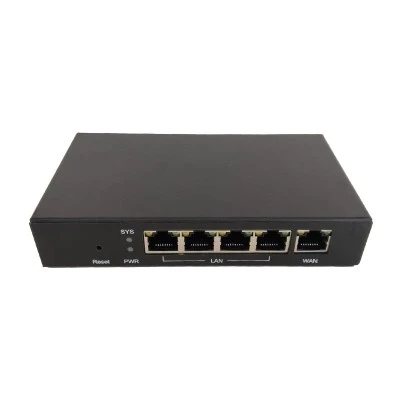
The primary function of this 5 port 10 100 desktop switch is to instantly expand the connectivity of your wired network. With this 5 port 10 100 desktop switch, you can connect up five Ethernet-ready devices-such as computers, printers, IP cameras, game consoles, or Smart TVs-to your router using just one of the router's LAN ports. This is an ideal solution for home environments, SOHO (Small Office/Home Office) setups, or small businesses where the built-in ports on the main router are insufficient.
As a Fast Ethernet switch, it provides dedicated 10/100 Mbps speeds on each port. This is more than sufficient for everyday internet tasks like web browsing, email, standard-definition video streaming, and VoIP calls. The 5 port 10 100 desktop switch operates using a "store and forward" switching architecture, which checks data packets for errors before forwarding them, ensuring reliable and error-free data transmission across your network.
It requires zero configuration. You can connect the power adapter simply, plug your devices into the ports using standard Ethernet cables, and it works immediately. All ports feature Auto MDI/MDI-X and Auto-Negotiation technology, which means there is no need for crossover cables, and the switch automatically detects the optimal speed (10 or 100 Mbps) and duplex mode for each connected device.
Designed to fit seamlessly into any environment, this switch features ultra-compact and lightweight design. It can be placed on a desktop or mounted on a wall using hidden mounting holes. Furthermore, the 5 port 10 100 desktop switch has no fans, so it operates in complete silence, making them perfect for noise-sensitive areas like bedrooms, libraries, or quiet office spaces.
Parameter
|
Description |
10/100Mbps Ethernet Unmanaged Switch |
|
Port |
5 |
|
Size |
80*50*23mm |
|
Material |
plastic |
|
Switching Capacity |
1 Gbps |
|
MAC Address Table |
1K |
|
Features |
support auto MDI/MDIX. Support MAC address self-learning and aging. Supports plug and play (UPnP) |
|
Protocol |
IEEE 802.3, IEEE 802.3u, IEEE 802.3x |
|
Forwarding Mode |
Store-and-forward |
|
Network Medium |
10Base-T: UTP category3,4,5 cable (maximum 100m) 100Base-T: UTP category5,5e cable (maximum 100m) |
|
Forwarding Rate |
10 Mbps:14,880pps 100 Mbps:148,800pps |
Hot Tags: 5 port 10 100 desktop switch, China 5 port 10 100 desktop switch manufacturers, 10 100 Mbps Desktop Switch, 100mbps ethernet switch, 24 Port 10 100 Fast Ethernet, 5 Port 10 100 Desktop Switch, Ethernet Switch 100 Mbps


